Listeners
Here is the angular stone of Webserial, the listeners. With them, you can listen to the events that the device emits.
How to listen to an event
Section titled “How to listen to an event”When you create a new instance of the Boardroid class, you can listen to the events that the device emits.
machine.on("serial:message", (data) => { console.log(data);});Each event has a different data structure, so you need to check the data structure for each event.
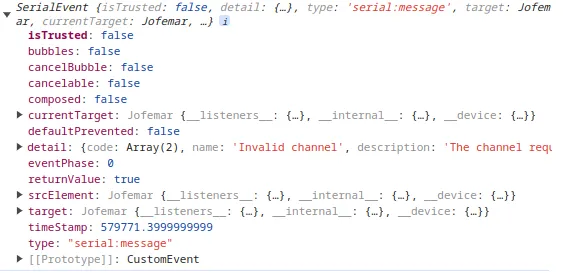
How to remove listener
Section titled “How to remove listener”To remove listeners follow the code as below shown.
// arrow functionconst onSerialMessage = (data) => {  console.log(data);};
// or if you prefer classic functions// function onSerialMessage(data) {//  console.log(data);// }
// start listenmachine.on("serial:message", onSerialMessage);
// stop listenmachine.off("serial:message", onSerialMessage);
Get all available listeners
Section titled “Get all available listeners”For boardroid class there events that you can listen to, of course only listen to the events that you need.
Object
Section titled “Object”To get all the available listeners, you can use the availableListeners property.
console.log(machine.availableListeners);The result will be an object with the available listeners, and if you are listen each event
[ { "type": "banknote-purse:banknote-scrow-status", "listening": false }, { "type": "banknote-purse:config", "listening": false }, { "type": "banknote-purse:event-banknote", "listening": false }, { "type": "banknote-purse:read-memory", "listening": false }, { "type": "banknote-purse:recycler", "listening": false }, { "type": "banknote-purse:save-memory", "listening": false }, { "type": "card-reader:event", "listening": false }, { "type": "change:pending", "listening": false }, { "type": "change:dispense", "listening": false }, { "type": "coin-purse:coin-event", "listening": false }, { "type": "coin-purse:config", "listening": false }, { "type": "coin-purse:reject-lever", "listening": false }, { "type": "coin-purse:reset", "listening": false }, { "type": "coin-purse:tubes", "listening": false }, { "type": "dispensed", "listening": false }, { "type": "dispensing", "listening": false }, { "type": "money:inserted", "listening": false }, { "type": "not-dispensed", "listening": false }, { "type": "percentage:test", "listening": false }, { "type": "run:default-load", "listening": false }, { "type": "serial:connected", "listening": true }, { "type": "serial:connecting", "listening": false }, { "type": "serial:disconnected", "listening": true }, { "type": "serial:error", "listening": true }, { "type": "serial:lost", "listening": false }, { "type": "serial:message", "listening": true }, { "type": "serial:need-permission", "listening": true }, { "type": "serial:reconnect", "listening": false }, { "type": "serial:sent", "listening": false }, { "type": "serial:soft-reload", "listening": true }, { "type": "serial:timeout", "listening": false }, { "type": "serial:unsupported", "listening": true }, { "type": "session:money-dispensed", "listening": false }, { "type": "session:money-request", "listening": false }, { "type": "event:door", "listening": false }, { "type": "status:relay", "listening": false }, { "type": "status:temperature", "listening": false }, { "type": "unknown", "listening": false }]But sometimes you don’t want the object you want only an array with the available listeners, you can do this:
machine.availableListeners.map((el) => el.type);And one more time here is the result
[ "banknote-purse:banknote-scrow-status", "banknote-purse:config", "banknote-purse:event-banknote", "banknote-purse:read-memory", "banknote-purse:recycler", "banknote-purse:save-memory", "card-reader:event", "change:pending", "change:dispense", "coin-purse:coin-event", "coin-purse:config", "coin-purse:reject-lever", "coin-purse:reset", "coin-purse:tubes", "dispensed", "dispensing", "money:inserted", "not-dispensed", "percentage:test", "run:default-load", "serial:connected", "serial:connecting", "serial:disconnected", "serial:error", "serial:lost", "serial:message", "serial:need-permission", "serial:reconnect", "serial:sent", "serial:soft-reload", "serial:timeout", "serial:unsupported", "session:money-dispensed", "session:money-request", "event:door", "status:relay", "status:temperature", "unknown"]Warning
Don’t use this event in production, only for debug. The amount of data can be huge and slow down the application.
If you want to know all events dispatched, you need to enable the debug mode.
machine.__debug__ = true; // enable debug modeSo then you can listen to the debug event.
machine.on("debug", (event) => { // event.detail = { // type: 'event', // data: 'data of event' // } console.log(event.detail);});Serial connected
Section titled “Serial connected”When the serial is connected, this event is dispatched.
machine.on("serial:connected", (event) => { console.log(event.detail);});Serial connecting
Section titled “Serial connecting”When the serial is trying to connect, this event is dispatched.
machine.on("serial:connecting", (event) => { if (event.detail.active) { console.log("Connecting to serial..."); } else { console.log("Connecting finished."); }});Serial disconnected
Section titled “Serial disconnected”When the serial is disconnected, this event is dispatched.
machine.on("serial:disconnected", (event) => { console.log(event.detail);});Serial error
Section titled “Serial error”When the serial has an error, this event is dispatched.
machine.on("serial:error", (event) => { console.log(event.detail);});Serial lost
Section titled “Serial lost”When the serial is lost, this event is dispatched.
machine.on("serial:lost", (event) => { console.log(event.detail);});Serial message
Section titled “Serial message”When the serial receives a message, this event is dispatched.
machine.on("serial:message", (event) => { console.log(event.detail);});Serial need permission
Section titled “Serial need permission”When the serial needs permission, this event is dispatched. This occurs because user interaction is needed to request the serial.
Recommendation: Use a button or a screen to show what is happening.
machine.on("serial:need-permission", (event) => { console.log(event.detail);});Serial reconnect
Section titled “Serial reconnect”When the serial is trying to reconnect, this event is dispatched.
machine.on("serial:reconnect", (event) => { // without data});Serial sent
Section titled “Serial sent”When the serial sends a message to machine, this event is dispatched.
machine.on("serial:sent", (event) => { console.log(event.detail);});{ "event": "string", "bytes": []}Serial soft reload
Section titled “Serial soft reload”When the serial is trying to soft reload, this event is dispatched.
machine.on("serial:soft-reload", (event) => { // without data});Serial timeout
Section titled “Serial timeout”When the serial has a timeout, this event is dispatched.
machine.on("serial:timeout", (event) => { console.log(event.detail);});Serial unsupported
Section titled “Serial unsupported”When the serial is unsupported, this event is dispatched.
machine.on("serial:unsupported", (event) => { console.log(event.detail);});Banknote purse
Section titled “Banknote purse”Scrow status
Section titled “Scrow status”Check if the banknote in scrow was accepted true or rejected false.
machine.on("banknote-purse:banknote-scrow-status", (event) => { console.log(event.detail.status);});Config
Section titled “Config”Get the status configured in the banknote purse.
machine.on("banknote-purse:config", (event) => { console.log(event.detail);});Structure of Event detail
Section titled “Structure of Event detail”{ "enabled": "boolean", "scrow": "boolean"}Event banknote
Section titled “Event banknote”When the banknote purse emits an event, i.e: banknote inserted
machine.on("banknote-purse:event-banknote", (event) => { console.log(event.detail);});Structure of Event detail
Section titled “Structure of Event detail”{ "stacker": { "p20": 0, "p50": 0, "p100": 0, "p200": 0, "p500": 0, "p1000": 0 }, "recycler": { "p20": 0, "p50": 0, "p100": 0, "p200": 0, "p500": 0, "p1000": 0 }, "out": { "p20": 0, "p50": 0, "p100": 0, "p200": 0, "p500": 0, "p1000": 0 }, "totals": { "p20": 0, "p50": 0, "p100": 0, "p200": 0, "p500": 0, "p1000": 0 }, "total": 0}Read memory
Section titled “Read memory”When you send the command to read memory, this event is dispatched.
machine.on("banknote-purse:read-memory", (event) => { console.log(event.detail);});Recycler
Section titled “Recycler”When sends the command to read recycler, this event is dispatched.
machine.on("banknote-purse:recycler", (event) => { console.log(event.detail);});Structure of Event detail
Section titled “Structure of Event detail”{ "recycler": { "p20": 0, "p50": 0, "p100": 0, "p200": 0, "p500": 0, "p1000": 0 }}Save memory
Section titled “Save memory”When you send the command to save memory, this event is dispatched.
machine.on("banknote-purse:save-memory", (event) => { console.log(event.detail);});Card reader
Section titled “Card reader”When the card reader emits an event, this event is dispatched.
machine.on("card-reader:event", (event) => { console.log(event.detail);});Change
Section titled “Change”Pending
Section titled “Pending”When the change is pending to deliver, this event is dispatched to show the amount of change pending.
machine.on("change:pending", (event) => { console.log(event.detail.pending);});Dispensing
Section titled “Dispensing”When the change is delivering, this event is dispatched to show the amount of change delivering.
In detail of event exists recycler, coins, pending, delivery
recycler is the amount of bills to be delivered
e.detail.recyler = { $_20: 0, $_50: 0, $_100: 0, $_200: 0, $_500: 0, $_1000: 0,};coins is the amount of coins to be delivered
e.detail.coins = { $_50c: 0, $_1: 0, $_2: 0, $_5: 0, $_10: 0 };pending is just a number >= 0 of change that can’t be delivered
delivery is the change that we can ensure will be delivered*
- This can fail
machine.on("change:dispense", (event) => { console.log(event.detail);});Coin purse
Section titled “Coin purse”Coin event
Section titled “Coin event”When the coin purse emits an event, this event is dispatched.
machine.on("coin-purse:coin-event", (event) => { console.log(event.detail);});Structure of Event detail
Section titled “Structure of Event detail”{ "tubes": { "g50": 0, "c50": 0, "p1": 0, "p2": 0, "p5": 0, "p10": 0 }, "box": { "g50": 0, "c50": 0, "p1": 0, "p2": 0, "p5": 0, "p10": 0 }, "totals": { "g50": 0, "c50": 0, "p1": 0, "p2": 0, "p5": 0, "p10": 0 }, "total": 0}Config
Section titled “Config”Get the status of coin purse, enabled true and disable false
machine.on("coin-purse:config", (event) => { console.log(event.detail.enabled);});Reject lever
Section titled “Reject lever”When the lever of the coin purse is pressed, this event is dispatched.
machine.on("coin-purse:reject-lever", (event) => { // no data});When the coin purse is reset, this event is dispatched.
machine.on("coin-purse:reset", (event) => { // no data});When the tubes of the coin purse are updated, this event is dispatched.
machine.on("coin-purse:tubes", (event) => { console.log(event.detail);});Structure of Event detail
Section titled “Structure of Event detail”{ "g50": 0, "c50": 0, "p1": 0, "p2": 0, "p5": 0, "p10": 0}Dispensed
Section titled “Dispensed”This event is dispatched when the machine dispenses a product, however the result of
const result = await dispatch(...) is more convenient because you can continue the execution of the code.
i.e: Dispensing cart of 5 products, you can continue the execution of the code after the first product is dispensed in a loop.
machine.on("dispensed", (event) => { // this event not return any data inside the event.detail});Dispensing
Section titled “Dispensing”This event is dispatched when the machine is in process of dispensing a product.
machine.on("dispensing", (event) => { console.log(event.detail);});Structure of event detail
Section titled “Structure of event detail”{ "status": null, "counter": 0, "limit": 15}Money Inserted
Section titled “Money Inserted”When insert money on coin purse or banknote purse, this event is dispatched.
machine.on("money:inserted", (event) => { console.log(event.detail);});Structure of Event detail
Section titled “Structure of Event detail”For banknote purse:
const _ = { type: "banknote", money: { value: 50, name: "50 pesos" }, where: "reycler", // or "stacker",};For coin purse:
const _ = { type: "coin", money: { value: 10, name: "10 pesos" }, where: "tube", // or "box",};Not dispensed
Section titled “Not dispensed”This event is dispatched when the machine doesn’t dispense a product. However, the result of
const result = await dispatch(...) is more convenient because you can continue the execution of the code.
i.e: Dispensing cart of 5 products, you can continue the execution of the code after the first product is dispensed in a loop.
machine.on("not-dispensed", (event) => { console.log(event.detail.reason);});Possible values for reason are:
timeoutno-stock
Percentage test
Section titled “Percentage test”When test of matrix is executed, this event is dispatched until finish the test.
machine.on("percentage:test", (event) => {  console.log(event.detail.percentage, event.detail.dispensed);
  // event.detail.dispensed is an array of products dispensed/not-dispensed});
Run default load
Section titled “Run default load”When the machine connects, dispatch this event. so if you want to disable payment methods, you can listen to this event.
machine.on("run:default-load", (event) => { // no data // machine.paymentPursesDisable();});Session
Section titled “Session”Money dispensed
Section titled “Money dispensed”When the machine dispenses money, this event is dispatched.
machine.on("session:money-dispensed", (event) => { console.log(event.detail);});Structure of Event detail
Section titled “Structure of Event detail”const _ = { type_money: "p50", // null|string retired: 50, // null|number -> amount of money retired finish: false, // boolean type: "banknotes", // string -> banknotes or coins};Money request
Section titled “Money request”When insert money in the machine, this event is dispatched.
machine.on("session:money-request", (event) => { // no data});Status
Section titled “Status”When the door is opened or closed, this event is dispatched.
machine.on("event:door", (event) => { console.log(event.detail.open);});When the relay is activated or deactivated, this event is dispatched.
machine.on("status:relay", (event) => { console.log(event.detail.enabled);});Temperature
Section titled “Temperature”When the temperature is requested, this event is dispatched.
machine.on("status:temperature", (event) => { console.log(event.detail.temperature);});Unknown
Section titled “Unknown”If the boardroid responds with an unknown event, this event is dispatched.
machine.on("unknown", (event) => { console.log(event.detail);});