Listeners
Here is the angular stone of Webserial, the listeners. With them, you can listen to the events that the device emits.
How to listen to an event
Section titled “How to listen to an event”When you create a new instance of the Relay class, you can listen to the events that the device emits.
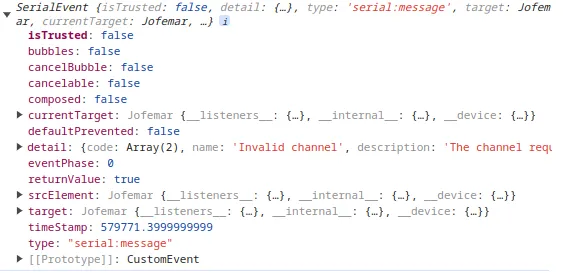
machine.on("serial:message", (data) => { console.log(data);});Each event has a different data structure, so you need to check the data structure for each event.
Get all available listeners
Section titled “Get all available listeners”For boardroid class there events that you can listen to, of course only listen to the events that you need.
Object
Section titled “Object”To get all the available listeners, you can use the availableListeners property.
console.log(machine.availableListeners);The result will be an object with the available listeners, and if you are listen each event
[ { "type": "debug", "listening": false }, { "type": "serial:connected", "listening": true }, { "type": "serial:connecting", "listening": false }, { "type": "serial:disconnected", "listening": true }, { "type": "serial:error", "listening": true }, { "type": "serial:lost", "listening": false }, { "type": "serial:message", "listening": true }, { "type": "serial:need-permission", "listening": true }, { "type": "serial:reconnect", "listening": false }, { "type": "serial:sent", "listening": false }, { "type": "serial:soft-reload", "listening": true }, { "type": "serial:timeout", "listening": false }, { "type": "serial:unsupported", "listening": true }]But sometimes you don’t want the object you want only an array with the available listeners, you can do this:
machine.availableListeners.map((el) => el.type);And one more time here is the result
[ "debug", "serial:connected", "serial:connecting", "serial:disconnected", "serial:error", "serial:lost", "serial:message", "serial:need-permission", "serial:reconnect", "serial:sent", "serial:soft-reload", "serial:timeout", "serial:unsupported"]Warning
Don’t use this event in production, only for debug. The amount of data can be huge and slow down the application.
If you want to know all events dispatched, you need to enable the debug mode.
machine.__debug__ = true; // enable debug modeSo then you can listen to the debug event.
machine.on("debug", (event) => { // event.detail = { // type: 'event', // data: 'data of event' // } console.log(event.detail);});Serial connected
Section titled “Serial connected”When the serial is connected, this event is dispatched.
machine.on("serial:connected", (event) => { console.log(event.detail);});Serial connecting
Section titled “Serial connecting”When the serial is trying to connect, this event is dispatched.
machine.on("serial:connecting", (event) => { if (event.detail.active) { console.log("Connecting to serial..."); } else { console.log("Connecting finished."); }});Serial disconnected
Section titled “Serial disconnected”When the serial is disconnected, this event is dispatched.
machine.on("serial:disconnected", (event) => { console.log(event.detail);});Serial error
Section titled “Serial error”When the serial has an error, this event is dispatched.
machine.on("serial:error", (event) => { console.log(event.detail);});Serial lost
Section titled “Serial lost”When the serial is lost, this event is dispatched.
machine.on("serial:lost", (event) => { console.log(event.detail);});Serial message
Section titled “Serial message”When the serial receives a message, this event is dispatched.
machine.on("serial:message", (event) => { console.log(event.detail);});Serial need permission
Section titled “Serial need permission”When the serial needs permission, this event is dispatched. This occurs because user interaction is needed to request the serial.
Recommendation: Use a button or a screen to show what is happening.
machine.on("serial:need-permission", (event) => { console.log(event.detail);});Serial reconnect
Section titled “Serial reconnect”When the serial is trying to reconnect, this event is dispatched.
machine.on("serial:reconnect", (event) => { // without data});Serial sent
Section titled “Serial sent”When the serial sends a message to machine, this event is dispatched.
machine.on("serial:sent", (event) => { console.log(event.detail);});{ "event": "string", "bytes": []}Serial soft reload
Section titled “Serial soft reload”When the serial is trying to soft reload, this event is dispatched.
machine.on("serial:soft-reload", (event) => { // without data});Serial timeout
Section titled “Serial timeout”When the serial has a timeout, this event is dispatched.
machine.on("serial:timeout", (event) => { console.log(event.detail);});Serial unsupported
Section titled “Serial unsupported”When the serial is unsupported, this event is dispatched.
machine.on("serial:unsupported", (event) => { console.log(event.detail);});