Listeners
Here is the angular stone of Webserial, the listeners. With them, you can listen to the events that the device emits.
How to listen to an event
Section titled “How to listen to an event”When you create a new instance of the Jofemar class, you can listen to the events that the device emits.
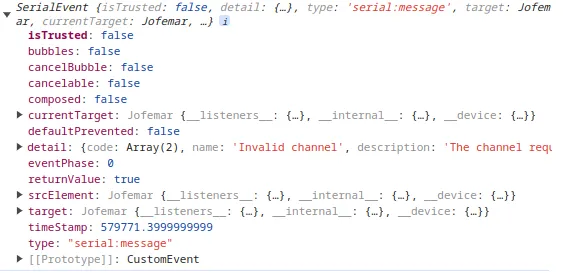
machine.on("serial:message", (data) => { console.log(data);});Each event has a different data structure, so you need to check the data structure for each event.
Get all available listeners
Section titled “Get all available listeners”For jofemar class there events that you can listen to, of course only listen to the events that you need.
Object
Section titled “Object”To get all the available listeners, you can use the availableListeners property.
console.log(machine.availableListeners);The result will be an object with the available listeners, and if you are listen each event
[ { "type": "channel:status", "listening": false }, { "type": "channels", "listening": false }, { "type": "check:beeper", "listening": false }, { "type": "check:elevator-speed", "listening": false }, { "type": "check:engine-voltage", "listening": false }, { "type": "check:expiration-after", "listening": false }, { "type": "check:expiration-by-temperature", "listening": false }, { "type": "check:extractor-after-dispense", "listening": false }, { "type": "check:isolation-tray", "listening": false }, { "type": "check:language", "listening": false }, { "type": "check:machine-id", "listening": false }, { "type": "check:push-over", "listening": false }, { "type": "check:standby-after-collect", "listening": false }, { "type": "check:standby-without-collect", "listening": false }, { "type": "check:temperature-before-expiration", "listening": false }, { "type": "check:temperature-scale", "listening": false }, { "type": "clock:registers", "listening": false }, { "type": "dispensed", "listening": false }, { "type": "dispensing", "listening": false }, { "type": "dispensing:withdrawal", "listening": false }, { "type": "door:event", "listening": false }, { "type": "jofemar:error", "listening": false }, { "type": "jofemar:warning", "listening": false }, { "type": "keyboard:pressed", "listening": false }, { "type": "machine:activity", "listening": false }, { "type": "machine:faults", "listening": false }, { "type": "not-dispensed", "listening": false }, { "type": "program:version", "listening": false }, { "type": "reset:errors", "listening": false }, { "type": "command-executed", "listening": false }, { "type": "serial:connected", "listening": false }, { "type": "serial:connecting", "listening": false }, { "type": "serial:disconnected", "listening": false }, { "type": "serial:error", "listening": false }, { "type": "serial:lost", "listening": false }, { "type": "serial:message", "listening": true }, { "type": "serial:need-permission", "listening": false }, { "type": "serial:reconnect", "listening": false }, { "type": "serial:sent", "listening": false }, { "type": "serial:soft-reload", "listening": false }, { "type": "serial:timeout", "listening": false }, { "type": "serial:unsupported", "listening": false }, { "type": "temperature:current", "listening": false }, { "type": "temperature:working", "listening": false }, { "type": "machine:status", "listening": false }, { "type": "unknown", "listening": false }, { "type": "corrupt:message", "listening": false }, { "type": "channels:progress", "listening": false }]But sometimes you don’t want the object you want only an array with the available listeners, you can do this:
machine.availableListeners.map((el) => el.type);And one more time here is the result
[ "channel:status", "channels", "check:beeper", "check:elevator-speed", "check:engine-voltage", "check:expiration-after", "check:expiration-by-temperature", "check:extractor-after-dispense", "check:isolation-tray", "check:language", "check:machine-id", "check:push-over", "check:standby-after-collect", "check:standby-without-collect", "check:temperature-before-expiration", "check:temperature-scale", "clock:registers", "dispensed", "dispensing", "dispensing:withdrawal", "door:event", "jofemar:error", "jofemar:warning", "keyboard:pressed", "machine:activity", "machine:faults", "not-dispensed", "program:version", "reset:errors", "command-executed", "serial:connected", "serial:connecting", "serial:disconnected", "serial:error", "serial:lost", "serial:message", "serial:need-permission", "serial:reconnect", "serial:sent", "serial:soft-reload", "serial:timeout", "serial:unsupported", "temperature:current", "temperature:working", "machine:status", "unknown", "corrupt:message", "channels:progress"]Warning
Don’t use this event in production, only for debug. The amount of data can be huge and slow down the application.
If you want to know all events dispatched, you need to enable the debug mode.
machine.__debug__ = true; // enable debug modeSo then you can listen to the debug event.
machine.on("debug", (event) => { // event.detail = { // type: 'event', // data: 'data of event' // } console.log(event.detail);});Serial connected
Section titled “Serial connected”When the serial is connected, this event is dispatched.
machine.on("serial:connected", (event) => { console.log(event.detail);});Serial connecting
Section titled “Serial connecting”When the serial is trying to connect, this event is dispatched.
machine.on("serial:connecting", (event) => { if (event.detail.active) { console.log("Connecting to serial..."); } else { console.log("Connecting finished."); }});Serial disconnected
Section titled “Serial disconnected”When the serial is disconnected, this event is dispatched.
machine.on("serial:disconnected", (event) => { console.log(event.detail);});Serial error
Section titled “Serial error”When the serial has an error, this event is dispatched.
machine.on("serial:error", (event) => { console.log(event.detail);});Serial lost
Section titled “Serial lost”When the serial is lost, this event is dispatched.
machine.on("serial:lost", (event) => { console.log(event.detail);});Serial message
Section titled “Serial message”When the serial receives a message, this event is dispatched.
machine.on("serial:message", (event) => { console.log(event.detail);});Serial need permission
Section titled “Serial need permission”When the serial needs permission, this event is dispatched. This occurs because user interaction is needed to request the serial.
Recommendation: Use a button or a screen to show what is happening.
machine.on("serial:need-permission", (event) => { console.log(event.detail);});Serial reconnect
Section titled “Serial reconnect”When the serial is trying to reconnect, this event is dispatched.
machine.on("serial:reconnect", (event) => { // without data});Serial sent
Section titled “Serial sent”When the serial sends a message to machine, this event is dispatched.
machine.on("serial:sent", (event) => { console.log(event.detail);});{ "event": "string", "bytes": []}Serial soft reload
Section titled “Serial soft reload”When the serial is trying to soft reload, this event is dispatched.
machine.on("serial:soft-reload", (event) => { // without data});Serial timeout
Section titled “Serial timeout”When the serial has a timeout, this event is dispatched.
machine.on("serial:timeout", (event) => { console.log(event.detail);});Serial unsupported
Section titled “Serial unsupported”When the serial is unsupported, this event is dispatched.
machine.on("serial:unsupported", (event) => { console.log(event.detail);});Channel status
Section titled “Channel status”This event is dispatched when you request the status of the channel.
machine.on("channel:status", (event) => { console.log(event.detail.active);});Channels progress
Section titled “Channels progress”When you run assignChannels method, the device will emit the channels:progress event during the process.
machine.on("channels:progress", (event) => { console.log(event.detail);});Structure of event detail
Section titled “Structure of event detail”{ "current": 2, "start": 1, "end": 80, "total": 80, "verified": 1, "percentage": 1.25}Channels
Section titled “Channels”When you run assignChannels method, the device will emit the channels event when finish the process.
machine.on("channels", (event) => { console.log(event.detail.channels);});// structure of event.detail.channels// [{// selection: 1,// active: true,// },// {// selection: 2,// active: false,// }, ...// ]Check events
Section titled “Check events”All the next events will start with check: because they are events that return when you consult something.
Check beeper
Section titled “Check beeper”Possible values are true or false.
machine.on("check:beeper", (event) => { // enable = true, disable = false console.log(event.detail.beeper);});Check elevator speed
Section titled “Check elevator speed”Possible values are low or high.
machine.on("check:elevator-speed", (event) => { console.log(event.detail.speed);});Check engine voltage
Section titled “Check engine voltage”Voltage will be a number between 5 and 9.5
machine.on("check:engine-voltage", (event) => { console.log(event.detail.voltage);});Check expiration after X minutes
Section titled “Check expiration after X minutes”Will return the minutes before the expiration.
machine.on("check:expiration-after", (event) => { console.log(event.detail.minutes);});Check expiration by temperature
Section titled “Check expiration by temperature”Possible values are true or false.
machine.on("check:expiration-by-temperature", (event) => { console.log(event.detail.enabled);});Check extractor after dispense
Section titled “Check extractor after dispense”Return seconds that the extractor will be active after dispense.
machine.on("check:extractor-after-dispense", (event) => { console.log(event.detail.seconds);});Check isolation tray
Section titled “Check isolation tray”Return the number of the isolation tray.
machine.on("check:isolation-tray", (event) => { console.log(event.detail.enabled);});Check language
Section titled “Check language”Return the language of the machine. Possible values are:
- Spanish
- English
- French
- unknown
machine.on("check:language", (event) => { console.log(event.detail.language);});Check machine ID
Section titled “Check machine ID”Return the machine ID.
machine.on("check:machine-id", (event) => { console.log(event.detail);});Check push over
Section titled “Check push over”Return is the selection consult is enabled or disabled to push over.
machine.on("check:push-over", (event) => { console.log(event.detail.push);});Check standby after collect
Section titled “Check standby after collect”Return the seconds that the machine will be waiting before go to standby after collect.
machine.on("check:standby-after-collect", (event) => { console.log(event.detail.seconds);});Check standby without collect
Section titled “Check standby without collect”Return the minutes that the machine will be waiting before go to standby without collect.
machine.on("check:standby-without-collect", (event) => { console.log(event.detail.minutes);});Check temperature before expiration
Section titled “Check temperature before expiration”Return the temperature before the expiration.
machine.on("check:temperature-before-expiration", (event) => { console.log(event.detail.temperature);});Check temperature scale
Section titled “Check temperature scale”Return the temperature scale.
Possible values are:
- Celsius
- Fahrenheit
machine.on("check:temperature-scale", (event) => { console.log(event.detail.scale);});Clock registers
Section titled “Clock registers”Return date and time of the machine.
dayis the day of the monthmonthis the month of the yearyearis the yearhoursis the hours of the dayminutesis the minutes of the hourformattedhas the formathh:mm DD-MM-YYdateis an instance ofDate
machine.on("clock:registers", (event) => { console.log(event.detail.formatted); // or console.log(event.detail.date.toLocaleString());});Dispensed
Section titled “Dispensed”This event is dispatched when the machine dispenses a product, however the result of
const result = await dispatch(...) is more convenient because you can continue the execution of the code.
i.e: Dispensing cart of 5 products, you can continue the execution of the code after the first product is dispensed in a loop.
machine.on("dispensed", (event) => { // this event not return any data inside the event.detail});Dispensing
Section titled “Dispensing”This event is dispatched when the machine is in process of dispensing a product.
machine.on("dispensing", (event) => { console.log(event.detail);});Structure of event detail
Section titled “Structure of event detail”{ "status": null, "counter": 6, "limit": 40}Dispensing withdrawal
Section titled “Dispensing withdrawal”This event is dispatched when the machine says the elevator is full, and you need to recall the products.
machine.on("dispensing:withdrawal", (event) => { console.log(event.detail);});Structure of event detail
Section titled “Structure of event detail”{ "elevator": true, "seconds": 50, "description": "Please recall products from the elevator"}Door event
Section titled “Door event”This event is dispatched when the door is opened or closed.
open is a boolean value.
machine.on("door:event", (event) => { console.log(event.detail.open);});Jofemar error
Section titled “Jofemar error”This event is dispatched when the machine emits an error.
machine.on("jofemar:error", (event) => { console.log(event.detail.type, event.detail.severity);});Possible type of error:
| type | severity | Description |
|---|---|---|
| jam | high | Elevator doesn’t move; move slowly or jammed |
| malfunction | high | Fault in elevator belt or photo sensors |
| photo-transistors | high | Fault in any of the cabinet’s photo sensors |
| without-channels | high | No channels detected |
| fault-keyboard | high | Fault in keyboard |
| eeprom-writing-error | critical | Eeprom writing error |
| channels-power-consumption-detector-faulty | critical | Channels power consumption detector faulty |
| elevator-not-find-delivery-position | high | Elevator does not find delivery position |
| interior-elevator-blocked | low | Interior of the elevator blocked |
| error-tester-product-detector | high | Error in tester of product detector |
Jofemar warning
Section titled “Jofemar warning”This event is dispatched when the machine emits a warning.
machine.on("jofemar:warning", (event) => { console.log(event.detail.type, event.detail.severity);});Possible type of warning:
| type | severity | Description |
|---|---|---|
| invalid-tray | low | Invalid requested tray |
| invalid-channel | low | Invalid requested channel |
| empty-channel | low | Empty channel (no stock) |
| fault-product-detector | low | Detecting product (product in elevator) |
| display-disconnected | low | Fault in 485 BUS (display disconnected) |
| product-under-elevator | low | Product under the elevator alarm |
| error-approaching-position | high | Error when elevator approaching to a position |
| fault-temperature-control | low | Fault communicating with temperature control |
| thermometer-disconnected | low | Thermometer is disconnected |
| thermometer-programming-lost | low | Thermometer programming lost |
| thermometer-faulty | low | Thermometer faulty |
| elevator-not-find-channel-tray | low | Elevator does not find channel/tray |
| product-expired-temperature | low | Product expired due to temperature |
| automatic-door-faulty | low | Automatic door faulty |
Keyboard pressed
Section titled “Keyboard pressed”This event is dispatched when the user presses a key on the keyboard.
Values for ascii when user press key are:
ABCD67892345*01#
machine.on("keyboard:pressed", (event) => { console.log(event.detail.ascii);});Machine activity
Section titled “Machine activity”This event is dispatched when you request the machine activity.
machine.on("machine:activity", (event) => { console.log(event.detail);});This event is more complex than the others, so here is the structure of the event detail.
Types of activity
Section titled “Types of activity”to divide the types, we have 3 types of activity:
- hhmmssWddMMAA
- HDU
- DU.d
hhmmssWddMMAA
Section titled “hhmmssWddMMAA”Structure of hhmmssWddMMAA
{ "ascii": "A", "type": "hhmmssWddMMAA", "date": "Instance of 'Date'", "hex": [], "formatted": "8/22/2024, 11:58:07 AM", "meaning": "description"}meanings:
{ "A": "Attempt to close product exit door", "C": "CLosing of exterior door", "H": "Error on opening of product exit door", "I": "New attempt to arrive at product exit position after an error on first attempt", "J": "Power on cooling unit", "K": "Power off cooling unit", "L": "Start of defrosting", "M": "End of defrosting", "O": "Opening of exterior door", "R": "Memory reset", "S": "Error on going to product exit position", "Y": "Power on machine", "Z": "Power off machine", "c": "Closing of inner door", "e": "New attempt to extract from channel due no product detection when elevator arrived to product exit position", "o": "Opening of inner door"}Structure of HDU
{ "ascii": "D", "type": "HDU", "hex": [], "hundreds": 1, "dozens": 1, "decimals": 0, "channel": 1, "meaning": "description"}meanings:
{ "B": "Error on going to tray channel", "D": "Error on product detector", "E": "Extraction of channel ok", "F": "Error on engine intensity detection", "G": "Error on product exit door"}Structure of DU.d
time is in seconds
{ "ascii": "T", "type": "DU.d", "dozens": 1, "units": 1, "decimals": 0, "time": 11.0, "meaning": "Extraction time (in seconds)"}Machine faults
Section titled “Machine faults”This event is dispatched when you request the machine faults. This will return the number of faults and the faults in an array.
machine.on("machine:faults", (event) => { console.log(event.detail);});{ "no_faults": 2, "faults": ["one", "two"]}Possible values for faults are:
- Busy
- Invalid tray
- Invalid channel
- Empty channel
- Jam in elevator engine
- Malfunction in the elevator belt or product detector
- Failure in one of the photo transistors in the cabinet
- No channels detected
- Product detector fault
- Machine display is disconnected
- Product alarm under elevator
- Error when elevator approaching to a position
- Fault in keyboard
- Eeprom writing error
- Fault communicating with temperature control
- The thermometer is disconnected
- Thermometer programming lost
- Thermometer faulty
- Channels power consumption detector faulty
- Elevator does not find channel or tray
- Elevator does not find delivery product position
- Interior of elevator blocked
- Error in tester of product detector
- Waiting for product to be removed
- Product expired by temperature reasons
- Automatic door faulty
- Product is expired
- Product detector didn’t change during its verification test
Not dispensed
Section titled “Not dispensed”This event is dispatched when the machine doesn’t dispense a product. However, the result of
const result = await dispatch(...) is more convenient because you can continue the execution of the code.
i.e: Dispensing cart of 5 products, you can continue the execution of the code after the first product is dispensed in a loop.
machine.on("not-dispensed", (event) => { console.log(event.detail.reason);});Possible values for reason are:
timeoutno-stockelevator-locked(Re-dispense will occur after elevator is unlocked, no action needed)no-response(Re-dispense will occur when machine responds, no action needed)
Program version
Section titled “Program version”This event is dispatched when you request the program version.
machine.on("program:version", (event) => { console.log(event.detail.version);});Reset errors
Section titled “Reset errors”This event is dispatched when you request to reset the errors (resetMachineErrors method or resetAllErrors method).
The reason it’s because the machine will check machine, and this can take around 25-60 seconds.
machine.on("reset:errors", (event) => {  console.log(event.detail);
// console.log(Date.now() > ended_at.getTime()); // do things with the information});{ "description": "Resetting machine errors", "duration": 25, "started_at": "instance of 'Date'", "finished_at": "instance of 'Date'"}Command executed
Section titled “Command executed”This event is dispatched when you send a command to the machine and the machine confirm receipt of the command.
machine.on("command-executed", (event) => { console.log(event.detail); // nothing relevant});Current temperature
Section titled “Current temperature”This event is dispatched when you request the current temperature.
machine.on("temperature:current", (event) => { console.log(event.detail.formatted);});Structure of event detail
Section titled “Structure of event detail”{ "sign": "+", "tens": 1, "units": 0, "decimals": 0, "type_degrees": "C", "formatted": "+10.0°C", "decimal_point": ".", "degrees": "°"}Working temperature
Section titled “Working temperature”This event is dispatched when you request the working temperature.
This is the temperature that the machine stop freezing.
machine.on("temperature:working", (event) => { console.log(event.detail.temperature);});Structure of event detail
Section titled “Structure of event detail”{ "hex": [], "temperature": { "traditional": 0.5, "ice_plus": -25 }}Machine status
Section titled “Machine status”This event is dispatched when you request the machine status.
machine.on("machine:status", (event) => { console.log(event.detail);});Unknown
Section titled “Unknown”This event is dispatched?.
machine.on("unknown", (event) => { console.log(event.detail);});Corrupt message
Section titled “Corrupt message”This event is dispatched when the machine receives a corrupt message.
machine.on("corrupt:message", (event) => { console.log(event.detail);});